
Contents
- 1 Improve Your Health and Productivity with the Right Electric Standing Desk
- 2 How Do Electric Standing Desks Work?
- 3 Health & Productivity Benefits of Electric Standing Desks
- 4 Best Electric Sit-Stand Desks Compared (Top picks 2026)
- 5 Each Desk — What You Need to Know
- 6 How to Choose the Best Standing Desk for You
- 7 Which Standing Desk Is Right for You?
- 8 Stand Up for Your Health and Productivity: Final Thoughts
- 9 Frequently Asked Questions About Electric Standing Desks
Improve Your Health and Productivity with the Right Electric Standing Desk
Having worked remotely for years as a software engineer, I know firsthand that sitting all day isn't just uncomfortable — it's a real productivity and health issue. Hours in the same position leads to back pain, poor posture, and that familiar mid-afternoon crash where you can barely focus.
A lot of people think a better chair will fix it. But even the best chair doesn't change the fact that you're staying still. Research from Harvard Health suggests that alternating between sitting and standing may help reduce discomfort from prolonged sitting and support overall health.
An electric standing desk makes that switch effortless — one button and you're standing. That convenience is exactly what makes people actually use it instead of leaving it at one height forever. Whether you're new to standing desks or thinking about upgrading, this guide covers the top options available right now with a clear comparison so you can find the right fit without getting lost in specs.
Here's what this guide covers:
- How electric standing desks work
- Why standing desks boost your health and output
- Top standing desk picks with a simplified comparison
- How to pick the right desk for your needs
How Do Electric Standing Desks Work?
Electric standing desks rely on motors to transition between sitting and standing positions automatically with the press of a button. Here's how the main parts work together:
- The Motor: At the heart of every electric standing desk is the motor system. Budget models typically have a single motor. Higher-end desks use dual motors — one in each leg — which deliver better stability, smoother lifting, and higher weight capacity. If you have a heavy setup, dual motor is worth it.
- Control Box: The control box acts as the communication hub between the motors and the control panel. It manages power and movement, and most modern control boxes support height memory presets and anti-collision technology to prevent accidental damage.
- Control Panel: This is your interface — raise or lower the desk, save your preferred heights, and switch between sitting and standing instantly. Many panels show the current height and include safety features like a child lock. Some models, like the FlexiSpot E7 Pro, also include built-in USB charging ports.
- Legs and Frame: Made from reinforced steel, the legs and frame keep everything stable even at maximum height. This matters most if you have multiple monitors or heavy equipment on your desk.
Health & Productivity Benefits of Electric Standing Desks
After years of working remotely, I can tell you that maintaining a healthy home workspace takes real effort. Sitting for long periods feels normal — until your back starts hurting and your focus drops. Your body is designed to move. When you stay seated for hours, blood flow slows down and your muscles disengage.
Switching to an adjustable standing desk was one of the best decisions I've made for my daily work routine. Here's what the research actually says:
- Burn More Calories: A study from the Mayo Clinic and WebMD showed that standing burns slightly more calories than sitting. Small changes throughout the day add up over time.
- Reduce Back Pain: Standing helps relieve pressure on your spine and improve posture over time. For a deeper look at how this works, read my full breakdown of standing desk benefits for back pain.
- Boost Your Mood: You know that mid-afternoon energy crash? Standing can help. Studies show it can reduce stress and fatigue.
- Improve Focus: Standing increases blood flow to the brain, which means more oxygen and better concentration. It's that simple.
- Lower Blood Sugar: A small study in Diabetes Care found that standing after lunch reduced blood sugar spikes compared to sitting. A small daily habit with a real impact.
Research consistently shows that our bodies function better when we move. Ready to make the switch? Let's find the right desk for you.
Best Electric Sit-Stand Desks Compared (Top picks 2026)
After weeks of researching and comparing the most popular electric standing desks available right now, I've narrowed it down to four solid options that cover every type of home office user — from budget-conscious first-timers to tall users with heavy setups who need the best specs available.
| Feature | ⭐ FlexiSpot E7 Pro | UPLIFT V3 | UPLIFT V2 Commercial | FlexiSpot E6 MAX |
|---|---|---|---|---|
| Our Verdict | 🏆 Best Overall | Best Premium | Best Commercial Frame | Best Budget |
| Height Range | 25" – 50.6" Tallest Max | 22.6" – 48.7" | 22.6" – 48.7" | 24.4" – 50.0" |
| Weight Capacity | 440 lbs Highest | 355 lbs | 355 lbs | 330 lbs |
| Motors | Dual motor | Dual motor | Dual motor | Dual motor |
| Motor Speed | 1.5"/sec | 2.0"/sec Fastest | 1.5"/sec | 1.5"/sec |
| Frame Style | C-Frame | C-Frame | C-Frame | T-Frame | 4-Legs | T-Frame |
| Assembly Time | ~45 min | ~10 min Easiest | ~30 min | ~45 min |
| Cable Management | Metal tray included | Built-in FlexMount Best | Basic | Basic |
| Memory Keypad | ✓ + USB ports | ✓ Advanced | ✓ | ✓ |
| Warranty | 15 years | 15 years | 15 years | 5 years |
| Best For | Tall users, heavy setups, best value | Easy assembly, premium feel, shorter users | Rock-solid stability, heavy loads, max customization | First-time buyers, simple setups |
| Check Price | FlexiSpot → | Uplift → | Amazon → | Amazon → |
Last updated May 2026 · Prices change often — always check current pricing before buying · Affiliate links disclosed
Each Desk — What You Need to Know
The specs that actually matter for home office use, plus my honest take on who each desk is really for.
FlexiSpot E7 Pro
The best combination of height range, weight capacity, and value in a standing desk right now. I use this every single day — and after 2+ years, it still feels like day one.
I'm 6'1" with a dual monitor and second laptop setup. My desk handles 44"+ standing height every single day with zero wobble. The 440 lb capacity means I never worry about overloading it. Cable management is solid with the included metal tray. Assembly takes about 45 minutes — more involved than UPLIFT — but once it's up, you won't think about it again for years.
✅ Why I use it
⚠️ Worth knowing
Affiliate link · No extra cost to you
UPLIFT V3
The easiest standing desk to set up and one of the most polished. If you hate complicated assembly or want a truly premium desk experience, this is the one.
The V3 is a genuine upgrade over older UPLIFT models. The click-in assembly is the fastest in this category — most people finish in under 10 minutes with almost no tools. The motor runs at 2.0"/sec and is noticeably quieter than FlexiSpot. The built-in FlexMount cable management is the cleanest system in this price range. The lower minimum height (22.6") also makes it the better pick for users under 5'4".
✅ Why it stands out
⚠️ Worth knowing
Affiliate link · No extra cost to you
UPLIFT V2 Commercial
The most rigid 2-leg standing desk in this guide. Built with a reinforced telescoping crossbar and dual German-made motors — designed for users who need extra frame strength, lower minimum height, or a heavy-duty home office setup.
The The V2 Commercial is the most rigid 2-leg desk in this guide. The reinforced telescoping crossbar adds real structural strength — especially at lower heights or with heavier loads. The 21.6" minimum height is one of the lowest available, making it ideal for shorter users. It comes with the full UPLIFT ecosystem: 48 accessory mounting points, dual German-made motors, anti-collision technology, and the same 15-year warranty as the V3, but the V2 still wins on customization depth.
✅ Choose UPLIFT V2 Commercial if you:
Affiliate link · No extra cost to you
FlexiSpot E6 MAX
Dual motors, memory presets, solid build quality — all the things that actually matter in a standing desk, at the most affordable price in this guide.
The E6 delivers the core standing desk experience — smooth electric adjustment, memory presets, stable frame — without the flagship price. The 330 lb capacity handles a standard single or dual monitor setup easily. If you have a very heavy multi-monitor setup or need max height above 49", upgrade to the E7 Pro. But for most first-time buyers, the E6 is a smart starting point.
✅ Choose FlexiSpot E6 if you:
Affiliate link · No extra cost to you
How to Choose the Best Standing Desk for You
Now that you've seen the top options, you might still feel unsure which one is right for you. There are a lot of specs — but honestly, only a few of them actually matter for a home office setup. Here's how to cut through the noise.
1. Size, Space and Height Range
Before looking at any desk, measure your available space. Then think about your setup — multiple monitors, speakers, accessories? You may need a larger desktop. And most importantly: consider your height. If you're tall like me, make sure the desk's max height actually supports a proper standing position — look for 3-stage legs and extended height ranges. If you're shorter, make sure the desk goes low enough when sitting.
2. Stability and Frame Style
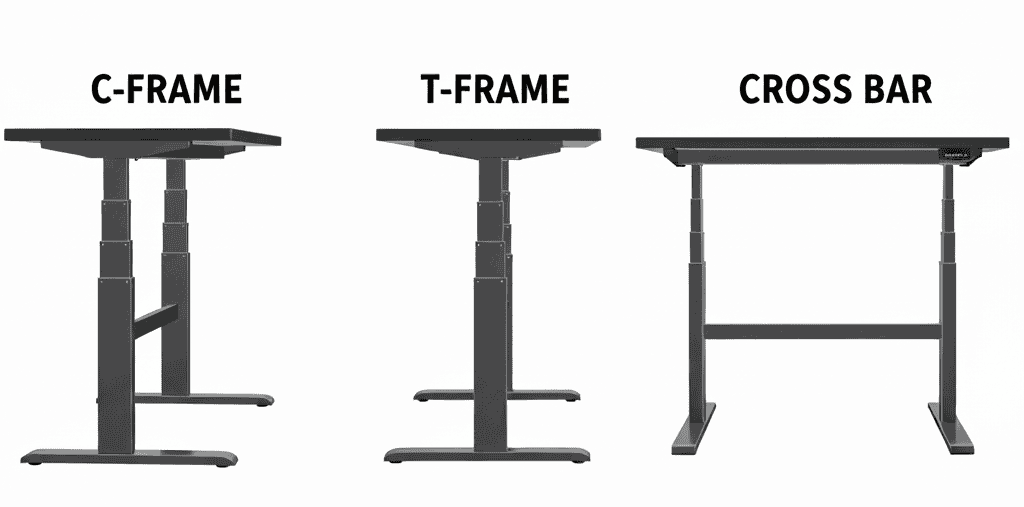
Frame design affects stability more than most people realize. A C-Frame has legs set slightly back from the edges — more legroom, easier to add accessories like drawers and cable trays, great for anti-fatigue mats. A T-Frame is more symmetrical and works for simpler setups but offers slightly less legroom. A 4-Leg Frame is the most stable option for large, heavy setups but takes up more floor space. All four desks in this guide use C-frame designs.
3. Adjustability and Ease of Use
Electric desks are more convenient than manual ones for exactly one reason: you'll actually use them. Adjusting manually takes effort — so people stop doing it. Electric motors make it a one-button action. Memory presets take it further — you save your sitting and standing heights once, and from then on it's instant. A good desk should also move smoothly and quietly without shaking or sudden stops.
4. Essential Features to Look For
- Cable management system to keep your workspace clean and organized.
- Built-in power outlets or USB ports for added convenience.
- Keyboard trays to help maintain proper ergonomics — adjustable trays are best.
5. Budget and Overall Value
Standing desks range from a few hundred dollars to well over a thousand. Set a realistic budget upfront — and think long-term. A slightly higher upfront cost can be worth it if the desk lasts longer and better supports your health. Also don't forget accessories: monitor arms, cable trays, drawers, and anti-fatigue mats can add to the total cost, so plan for them in advance.
💡 One More Thing People Forget
A good standing desk needs a good mat. Standing directly on hardwood or tile — even for 20 minutes — will make your feet ache and send you back to your chair. I use the Ergodriven Topo and it genuinely changed how often and how long I stand.
Read my Topo mat review — what changed after 3 weeks →Which Standing Desk Is Right for You?
Choosing the right standing desk isn't about buying the most expensive option — it's about finding the one that fits your body, your space, and how you actually work. Here's a simple way to narrow it down.
If You're Tall or Use Heavy Equipment
Go with: FlexiSpot E7 Pro
If you're over average height, run multiple monitors, or have a heavy setup — stability is critical. The E7 Pro's 50.6" max height and 440 lb capacity make it the strongest choice for long workdays and real ergonomic comfort. I personally use this desk daily, and it's made a noticeable difference in my comfort and back support. Read my full FlexiSpot E7 Pro review →
FlexiSpot E7 Pro — Check current price →If You Want the Best Value Without Sacrificing Quality
Go with: FlexiSpot E6 — Not everyone needs a flagship desk. If you want strong dual-motor performance, smooth adjustments, and solid build quality at a more affordable price, the E6 is the smart move. A great first standing desk without overspending.
FlexiSpot E6 — Check price at Amazon →If Stability & Heavy-Duty Frame Matters
Go with: UPLIFT V2 Commercial — If you work mostly at lower heights or run a heavy setup and need maximum stability, the V2 Commercial is the stronger frame. The telescoping crossbar and reinforced design make it the most rigid two-leg desk in this guide.
UPLIFT V2 Commercial — Check current price →If You Want Fast Setup and Zero Hassle
Go with: UPLIFT V3 — Click-in assembly done in under 10 minutes. If you hate complicated setup or want the cleanest out-of-box experience, the V3 is hard to beat. Premium feel, built-in cable management, quieter motor.
UPLIFT V3 — Check current price →The best standing desk is the one you'll actually use consistently. Focus on comfort, stability, and how the desk fits your daily routine — not just specs on paper.
Stand Up for Your Health and Productivity: Final Thoughts
Switching to a standing desk isn't about following a trend — it's about building a workspace that actually supports your body and the way you work.
After years of working remotely and researching today's best electric standing desks, one thing is clear: the right sit-stand desk can make a real difference in comfort, focus, and long-term health — especially if you spend most of your day at a computer.
There's no single "best" desk for everyone. The best choice is the one that fits your height and workspace, your equipment and load requirements, how often you switch between sitting and standing, and of course, your budget.
Whether you need a rock-solid desk for heavy setups, a commercial-grade frame with maximum stability, or something quick and easy to assemble — the options above are some of the strongest available today, based on real specs, user feedback, and hands-on research. If you're ready to reduce back pain, improve posture, and feel better during long workdays, a quality electric standing desk is a smart investment. Take your time, compare the features, and choose the desk that supports how you work — not just how it looks on paper.
Still not sure? Here's where I'd start.
For most home office workers — especially tall ones — the FlexiSpot E7 Pro is the safest bet. Best max height, highest weight capacity, best value at its quality level. It's what I use every single day, and after 2+ years I'd buy it again without hesitation.
Affiliate link disclosed · No extra cost to you
Frequently Asked Questions About Electric Standing Desks
What is the best electric standing desk for home offices?
It depends on your height, workspace, and how much equipment you use. For most home office users, the FlexiSpot E7 Pro is the best overall choice — widest height range, highest weight capacity, and best value at its quality level. If you're on a budget, the FlexiSpot E6 is a solid first desk. If you want the easiest assembly and premium feel, the UPLIFT V3 is the one.
FlexiSpot E7 Pro — Check current price →Are electric standing desks better than manual standing desks?
For everyday home office use, yes — and the reason is simple. Electric desks make adjusting effortless, so you actually do it throughout the day. Manual desks require physical effort every time, and most people stop adjusting after a few days. If you're investing in a standing desk, go electric.
What is the difference between C-frame and T-frame standing desks?
A C-frame has legs set slightly back from the edges, giving you more legroom underneath and making it easier to add accessories like drawers, keyboard trays, and cable systems. A T-frame is more centered and symmetrical — works fine for simple setups but gives you less flexibility. For most home offices, C-frame is the better choice.
Do standing desks help with back pain?
They can — but it's the movement that helps, not just standing. Alternating between sitting and standing reduces prolonged pressure on the spine and supports better posture over time. I've personally noticed a big difference in my lower back pain since switching. For a deeper breakdown, read my post on standing desks and back pain.
What height range should an electric standing desk have?
A good electric standing desk should support both your seated and standing elbow height — arms at roughly 90°. Taller users (6'0"+) typically need a max height above 49". Shorter users (under 5'4") need the desk to go below 25" when sitting. If you're between those heights, most quality desks will work fine.
How much weight can electric standing desks support?
Most quality electric standing desks support between 200 and 440 lbs. For a standard single-monitor home office setup, 220 lbs is plenty. For a heavy multi-monitor setup with a desktop computer and peripherals, look for at least 300–355 lbs. The FlexiSpot E7 Pro at 440 lbs is the highest in its price range and handles any home office setup comfortably.
Are electric standing desks stable at standing height?
Good ones are. Stability depends on the frame design, motor quality, and weight distribution. Desks with dual motors, 3-stage legs, and C-frame designs are the most stable at higher positions. From my own 2+ years using the FlexiSpot E7 Pro at 44"+ standing height with a full dual-monitor setup — zero wobble at any height.
Is it worth investing in an electric standing desk?
If you work long hours at a desk, yes — it's one of the highest-impact upgrades you can make to your home office. The health benefits are real, the productivity improvement is real, and a quality desk lasts 10–15 years. Think of it less as furniture and more as a long-term investment in how you feel at work every day.
FlexiSpot E7 Pro — Best overall pick →