
⚡ Quick Verdict — Skip to What Matters
👇 Short on time? The verdict is in the table below. Or scroll to Final Verdict to skip straight to my recommendation.
If you're stuck choosing between the UPLIFT V3 and the FlexiSpot E7 Pro — good. That means you've already done the research and narrowed it down to two genuinely great desks. The hard part now is picking the right one for you.
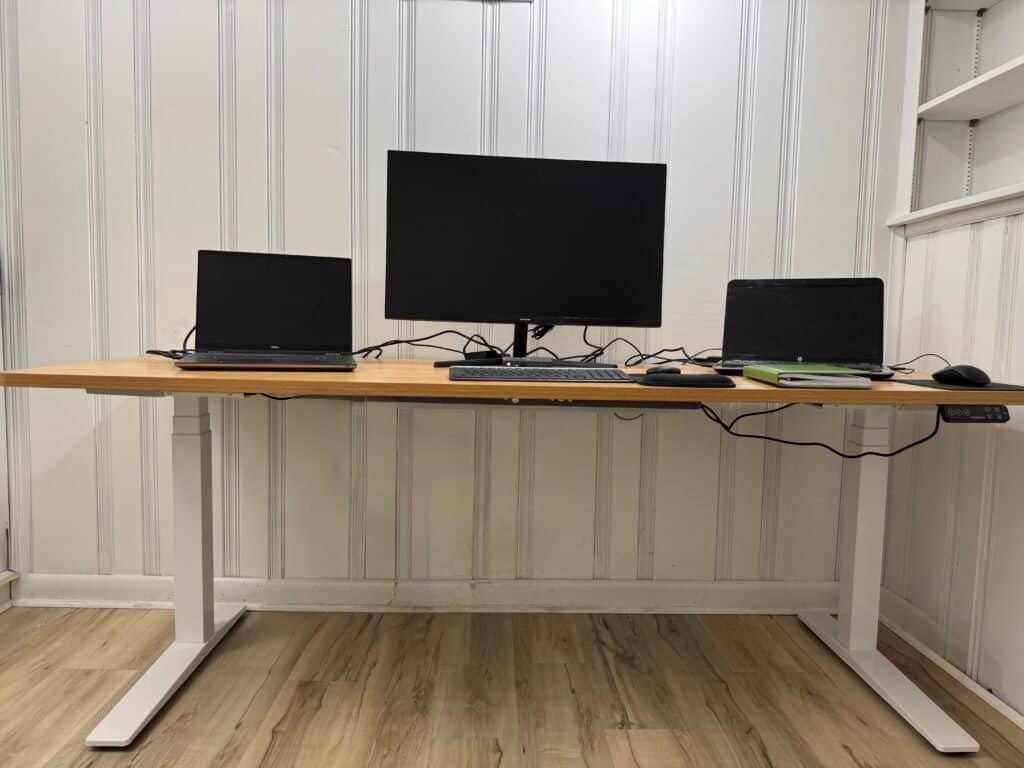
I've used the FlexiSpot E7 Pro every single day for over 2 years. I'm 6'1", deal with lower back pain, and run a dual monitor + 2 laptop setup — so I know exactly how it performs under real conditions, not just on paper. I've also done a deep dive into the UPLIFT V3 specs, reviews, and real user feedback to give you a fair comparison.
Here's the short version: they're both excellent — but built for different people. I'll show you exactly which one fits your situation so you don't overpay or miss something that matters.
Contents
Uplift V3 vs FlexiSpot E7 Pro: Side-by-Side Comparison
| Feature | UPLIFT V3 | FlexiSpot E7 Pro |
|---|---|---|
| Price | Higher (premium) | More affordable WIN |
| Max Height | 48.7" | 50.6" WIN (taller users) |
| Min Height | 22.6" WIN (shorter users) | 25" |
| Weight Capacity | 355 lbs | 440 lbs WIN |
| Frame Style | 3-stage C-Frame | 3-stage C-Frame TIE |
| Stability at Max Height | Excellent (I-beam) | Excellent (C-frame) TIE |
| Motor Speed | 2.0"/sec WIN | 1.5"/sec |
| Assembly Time | ~5–10 min (click-in) WIN | ~45 min (bolt) |
| Cable Management | Built-in FlexMount WIN | Metal tray included |
| Customization | Extensive (48 mount points) WIN | Standard options |
| Memory Keypad + USB | Included | Included TIE |
| Warranty | 15 years | 15 years TIE |
| Best For | Premium feel, easy setup, shorter users | Tall users, heavy setups, best value |
Last updated May 2026 · Prices may vary · Always check current pricing before buying
FlexiSpot E7 Pro
Best for: tall users, heavy setups, budget-conscious buyers. 440 lb capacity, 50.6" max height.
No extra cost to you · Affiliate link disclosed
UPLIFT V3
Best for: easier assembly, more customization, quieter motor. Great if budget isn't the main factor.
No extra cost to you · Affiliate link disclosed
What I Actually Like About Each Desk
UPLIFT V3
Premium PickThe V3 is a genuine upgrade over the older UPLIFT models. The click-in assembly is the fastest I've seen in this category — most people are done in under 10 minutes with almost no tools. The motor runs at 2.0"/sec (FlexiSpot is 1.5") and it's noticeably quieter. The built-in FlexMount cable management is cleaner than anything else at this price. If you value the out-of-box experience and a polished premium feel, UPLIFT earns that premium.
One honest tradeoff: You're paying a real premium. If budget matters to you at all, the FlexiSpot gives you more desk per dollar.
✅ Choose UPLIFT V3 if you:
Read more: My full UPLIFT V3 review →
FlexiSpot E7 Pro
My Daily Desk · 2+ YearsI've used this desk every single day for over 2 years. I'm 6'1", I use it at 44" standing height, and my setup includes a 32" monitor, 2 laptops, and extra peripherals. At no height — including near maximum — has it ever wobbled. The 440 lb capacity is one of the highest at this price point, and I can genuinely say this desk feels like it was built to last. The assembly took me about 45 minutes — not the easiest — but once it's up, you never have to think about it again.
One honest tradeoff: Assembly is more involved than UPLIFT — plan for 45–60 minutes and ideally have someone help you lift the desktop.
✅ Choose FlexiSpot E7 Pro if you:
Read more: My full FlexiSpot E7 Pro review — 2 years of daily use →
Which Standing Desk Should You Actually Buy?
Both desks are genuinely excellent — you won't go wrong with either. But they're built for slightly different people, and the wrong choice means paying more than you need to or missing a feature that matters to you.
My personal take: If I were buying today and price mattered, I'd go FlexiSpot E7 Pro without hesitation — it's what I use daily and it's held up perfectly for 2+ years at 6'1" with a heavy setup. If money is less of a concern and I wanted the cleanest out-of-box experience, I'd go Uplift V3.
Affiliate links — I earn a small commission at no extra cost to you. Full disclosure here.
🧩 Complete Your Setup
Whichever desk you choose, pair it with a good mat. I use the Ergodriven Topo every day with my standing desk and it genuinely extended how long I can stand comfortably.
Read my Topo mat review — 3 weeks of daily use →Frequently Asked Questions
Which desk feels more stable when standing?
Both are solid for everyday use — typing, meetings, dual monitors, no issues with either. The difference only shows up at taller heights or with a really heavy setup. The UPLIFT V3 has a reinforced steel frame with I-beam crossbar rails, so it edges ahead at max height on paper.
From my own experience using the FlexiSpot E7 Pro daily at 6'1" with a heavy dual-monitor setup — it feels rock solid, even close to max height. I've had zero wobble issues in 2+ years.
Which one is better if I'm tall?
The FlexiSpot E7 Pro goes higher — 50.6" max vs UPLIFT's 48.7". That 2" difference matters if you're 6'2" or taller. I'm 6'1" and use mine at around 44–48" standing height, and it's perfect. If you're on the shorter side (under 5'4"), flip it — the UPLIFT V3 goes lower at 22.6" vs FlexiSpot's 25" minimum.
FlexiSpot E7 Pro — Best for tall users →Can these desks handle dual or triple monitors?
Easily. A full setup with three 32" monitors, two laptops, keyboard, mouse, and a laser printer weighs roughly 70–100 lbs. The FlexiSpot E7 Pro handles up to 440 lbs and the UPLIFT V3 handles 355 lbs — add in the desktop surface (30–50 lbs) and you're still nowhere near the limit. I personally run a 32" monitor and two laptops on my E7 Pro with zero issues.
Why is the UPLIFT V3 more expensive?
You're paying for ANSI/BIFMA X5.5-2021 certification, the click-in assembly system (5–10 minutes vs 45+ for FlexiSpot), the built-in FlexMount cable management, 48 threaded mounting points for accessories, and a more premium overall feel. It's not that FlexiSpot is bad — it's that Uplift charges more for the out-of-box experience and customization ecosystem.
UPLIFT V3 — Check current price →Which one is easier to put together?
UPLIFT V3 by a mile. The V3 uses a click-in leg design — most people are done in under 10 minutes with no tools. The FlexiSpot E7 Pro isn't hard, but it's a traditional bolt-together assembly that took me closer to 45 minutes, especially with a larger desktop. If easy assembly matters to you, Uplift wins this clearly.
Do both desks have memory presets?
Yes — both come with memory keypads where you can save your sitting and standing heights and switch with one button. The FlexiSpot E7 Pro includes a keypad with USB ports built in by default. Once you start using presets daily, you'll wonder how you ever adjusted manually. This is one of the best features of any electric standing desk.
Which one is better value overall?
The FlexiSpot E7 Pro is the better value — especially when it goes on sale, which happens regularly. You get a 440 lb capacity, higher max height, and proven durability at a lower price. The UPLIFT V3 is worth the extra cost if you want the premium assembly experience, more customization options, or need the lower minimum height. But for pure value per dollar, FlexiSpot wins.
FlexiSpot E7 Pro — Check current price →