
In this guide, you’ll learn:
-
What actually helps reduce back pain at a desk
-
Which standing desk features matter most
-
Which desks are worth considering based on real use and research
 Best Electric Standing Desks (Full Guide)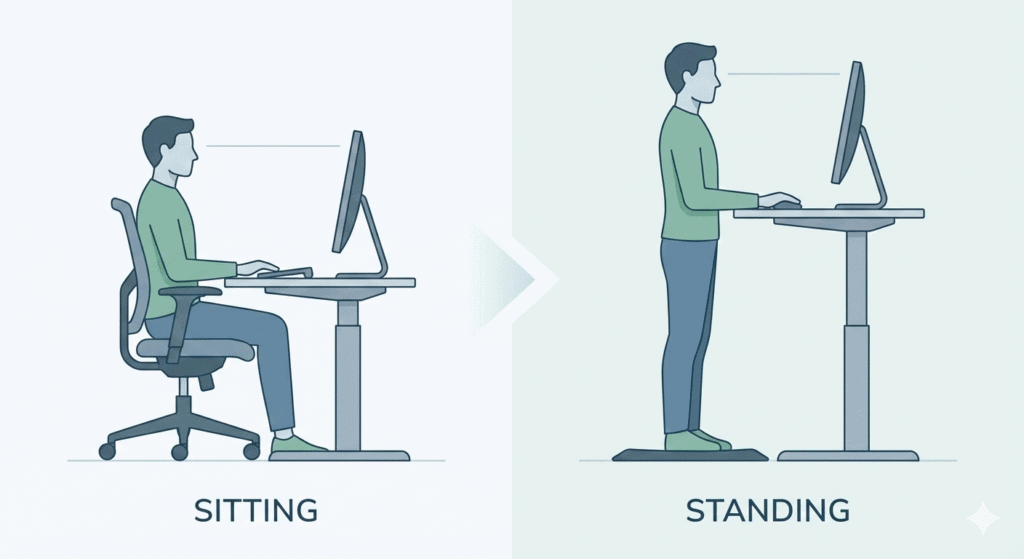
What Makes a Standing Desk Good for Back Pain?
Not every standing desk supports healthy posture. These are the features that matter most if back pain is your main concern.
1. Wide Height Range (Especially for Tall Users)
A desk that doesn’t reach your ideal standing height can force poor posture, increasing strain on your lower back and neck.
Taller users need desks that reach 48–50″+
Sitting height should allow 90° elbow bend
 This is especially important if you already have lower back pain.
2. Stability Matters More Than Weight Capacity
Wobble causes:
Micro-tension in your core
Shoulder and back fatigue
Poor posture compensation
3. Easy Position Switching (You’ll Actually Use It)
If adjusting the desk feels like work, you won’t do it often enough.
Electric desks with:
Memory presets
Smooth, quiet motors
…make it far easier to maintain healthy movement patterns.
Best Standing Desks for Back Pain (Based on Real Use & Research)
Important note: I only recommend desks that meet ergonomic requirements. No medical claims, no miracle promises.
FlexiSpot E7 Pro — Best Overall for Back Pain
The FlexiSpot E7 Pro stands out because it addresses the most common back-pain problems:
Wide height range (especially helpful for taller users)
Dual-motor system for smooth adjustments
Stable frame that encourages frequent movement
Why it helps: Being able to switch positions easily reduces prolonged spinal compression, one of the main contributors to lower back discomfort.
Read my full FlexiSpot E7 Pro review
Check current price at FlexiSpot
Mid-Range Electric Desks (Good Value Option)
If you want the benefits of a standing desk without paying premium prices, a solid mid-range electric desk can still be a great choice — especially if your main goal is reducing back pain through better posture and more movement.
When shopping in this category, focus less on brand names and more on how the desk actually supports your body:
Look for dual motors for smoother and more stable height adjustments
Make sure the height range fits you, both when sitting and standing
Choose a desk that feels sturdy at full height, so you’re not fighting wobble while typing
Memory presets are a big plus, because they make switching positions quick and effortless
What matters most is consistency. A desk that’s easy to adjust is one you’ll actually use throughout the day — and that’s where the real back pain relief comes from.
Stability and height range matter more than brand name.
If you’d like to compare several reliable electric desks side by side, I’ve put together a full breakdown here:
👉 Best Electric Standing Desks 2026 (Comparison Guide)
Standing Desk Converters (Limited Use)
Standing desk converters can be a helpful short-term solution if you’re not ready to invest in a full electric standing desk yet. They sit on top of your existing desk and let you raise your monitor and keyboard to a standing position.
However, they do come with some limitations—especially for people dealing with ongoing back pain:
Height adjustment is often less precise, which can make it harder to find a truly comfortable posture
Stability can be an issue, especially when typing or leaning on the surface
Workspace is usually smaller, which may force awkward arm or shoulder positions
Frequent lifting can feel inconvenient, so you may switch positions less often than recommended
Converters can work for light use or temporary setups, but if back pain is a serious concern, a full electric standing desk offers much better support, stability, and long-term comfort.
For consistent posture improvement and easier movement throughout the day, most people eventually find that a dedicated standing desk is the better option.