| | |
FlexiSpot E7 PRO Standing Desk
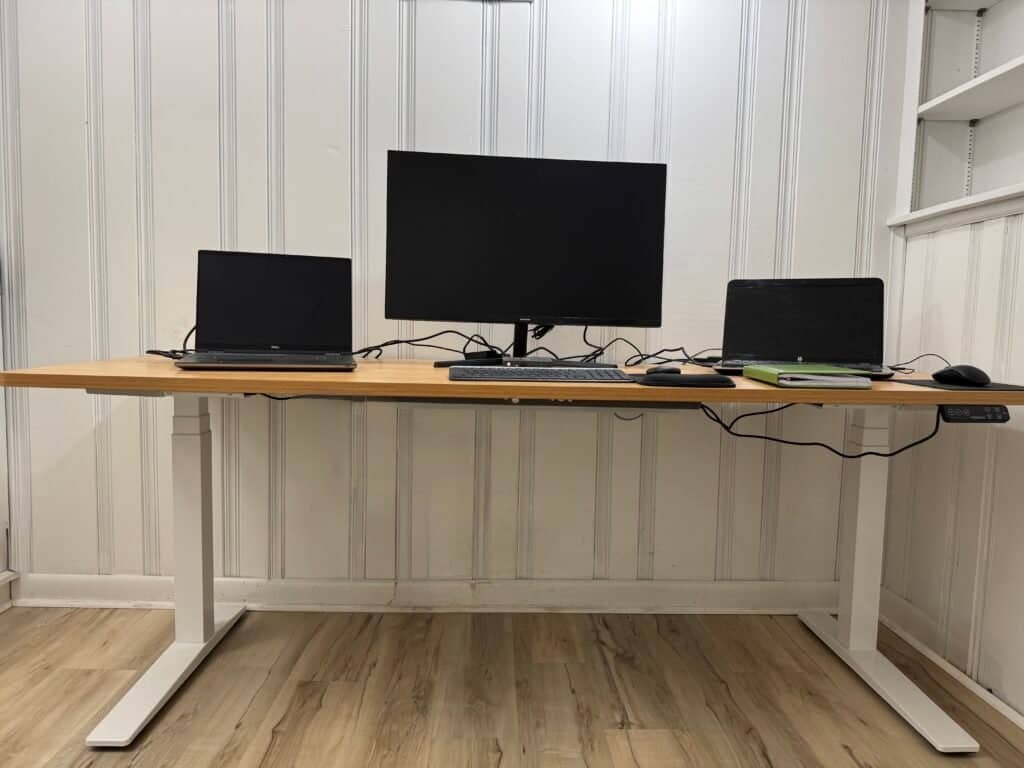
Best Overall for Tall Users & Heavy Setups (My Daily Desk) The FlexiSpot E7 Pro is the standing desk I personally use every day.
It’s built for tall users and demanding home-office setups, offering rock-solid stability at standing height, a powerful dual-motor system, and excellent out-of-the-box cable management.
If you work long hours or deal with back pain, this desk is designed to support proper ergonomics without wobble.
I’ve shared my full hands-on experience in this detailed review:
FlexiSpot E7 Pro Standing Desk Review
|
- Max Load Capacity: Supports up to 440 lbs, ideal for multi-monitor and heavy home-office setups.
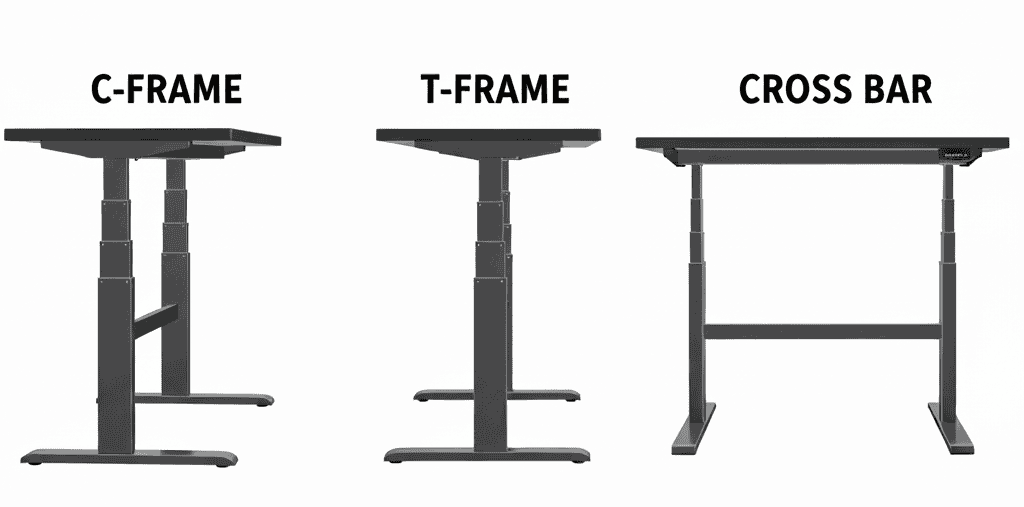
- Frame Design: Durable C-frame steel construction for extra legroom and long-term stability.
- Motor System: Smootah and quiet dual-motor lift with consistent height adjustment.
- Leg Structure: 3-stage lifting columns for extended height range and better ergonomics for tall users.
- Height Range: Adjustable from 25.0″ to 50.6″, suitable for users over 6 feet tall.
- Smart Keypad: LCD display with 4 height memory presets, child lock, and USB charging port.
- Desktop Options: Available in rectangular or curved designs, including a premium bamboo desktop.
- Desktop Sizes: Multiple sizes from 48″×24″ up to 78″×30″ to fit different room layouts.
- Cable Management: Under-desk cable tray for a clean, clutter-free workspace.
- Safety Features: Built-in anti-collision system to prevent damage while adjusting height.
- Storage Options: Optional under-desk drawers for added organization.
|
- ✓ Excellent height range for tall users
- ✓ Extremely stable, even at max height
- ✓ High 440 lb weight capacity
- ✓ Clean cable management included
- ✓ Multiple desktop size options
- ✗ Large desktop sizes are heavy
- ✗ May require two people to assemble and more floor space
|
Uplift V3 Standing Desk
Best for: Premium stability, Heavy setups & long workdays (latest UPLIFT model)
The UPLIFT V3 Standing Desk is the newest upgrade in UPLIFT’s lineup, designed to improve stability, cable management, and ease of assembly compared to the V2 and Commercial V2 models.
It features a reinforced commercial-grade steel frame, smoother dual-motor lift system, and UPLIFT’s new FlexMount Cable Management system for a cleaner workspace.
This desk is ideal for users who want a highly customizable workstation with excellent stability for multi-monitor and heavy home office setups.
UPLIFT V3 is built to support consistent daily height changes without wobble.
Check my detailed review for Uplift V3 |
- Max Load Capacity: Supports up to 355 lbs, suitable for dual monitors and heavy setups.
- Frame Design: Commercial-grade C-frame steel construction for added stability.
- Motor System: Smootah and quiet dual-motor lift with consistent height adjustment.
- Leg Structure: 3-stage lifting columns for extended height range and better ergonomics for tall users.
- Height Range: Adjustable from 22.6” to 48.7”, suitable for shorter and taller users.
- Smart Keypad: Digital display with 4 memory presets, safety lock, and optional USB charging.
- Desktop Options: Rectangle and live-edge designs with laminate, bamboo, and solid wood tops..
- Desktop Sizes: MMultiple sizes from 42”x24” up to 80”x30”.
- Cable Management: New FlexMount Cable Manager for organized cords and accessories.
- Safety Features: Built-in anti-collision system to prevent damage while adjusting height.
- Accessories: Power grommets, casters, foot hammock, wireless foot switch, and more.
|
- ✓ Excellent stability even at standing height
- ✓ Wide height range for tall and short users
- ✓ Very strong 355 lb weight capacity
- ✓ Easy assembly with click-in components
- ✓ Integrated FlexMount cable management
- ✓ Extremely customizable with many accessories
- ✓ Quiet and smooth height transitions
- ✗ More expensive than budget standing desks
- ✗ Accessories can add to the total cost
- ✗ Heavy components may require two people to assemble
|
FlexiSpot E6 MAX Standing Desk
Best for: Home office users who want dual-motor strength at a more affordable price
The FlexiSpot E6 Max Standing Desk offers an excellent balance of strength, stability, and price.
With dual motors, a 330 lb weight capacity, and smooth height adjustments.
It’s a strong choice for users who want premium performance without paying flagship pricing. |
- Max Load Capacity: 330 lbs.
- Frame Design: T-Frame.
- Motor System: Dual electric motors.
- Height Range: Adjustable from 24.4″ to 50″.
- Leg Structure: 3-stage lifting columns.
- Control Panel: LCD keypad with 4 height memory.
- Desktop Options: Rectangle or curved, Bamboo option available.
- Desktop Sizes: 48″×24″ up to 78″×30″.
- Cable Management: Optional under-desk cable tray.
- Safety Features: Anti-collision system.
- Mobility: Optional caster wheels on legs.
|
- ✓ Strong dual-motor performance for the price
- ✓ High 330 lb weight capacity
- ✓ Smooth and quiet height transitions
- ✓ Wide range of desktop sizes and finishes
- ✓ Excellent value compared to higher-end models
- ✗ Assembly may take longer for first-time users
- ✗ Larger desktops may require two people to lift
|
Uplift V2 Standing Desk
Best for Customization & Accessories
The UPLIFT V2 Standing Desk is a strong option for users who want a highly customizable sit-stand desk with a wide range of desktop sizes, materials, and accessories.
It’s ideal for building a personalized workstation over time.
One of its standout features is UPLIFT’s patented accessory mounting system, which includes 48 threaded mounting points.
In addition, built-in grommet holes allow for clean cable routing and support power, storage, and accessory add-ons.
This flexibility makes the UPLIFT V2 especially appealing to taller users or anyone who plans to expand their setup gradually. |
- Max Load Capacity: 355 lbs.
- Frame Style: C-Frame.
- Motor System: Dual electric motors.
- Height Range: Adjustable from 25.3" to 50.9".
- Leg Design:Inverted 3-Stage legs.
- Stability Enhancements: 45° stability braces at the top of each leg.
- Keypad: Flush-mounted memory keypad (up to 4 presets).
- Safety Features: Keypad-activated child lock.
- Desktop Shapes: Rectangle & Curved.
- Desktop Sizes: 42″×30″ to 80″×30″.
- Cable Management: Wire management tray.
- Extra Features: Grommet holes, patented accessory mounting system.
- Anti-Collision System: Yes.
|
- ✓ Excellent height range for tall users
- ✓ Supports heavy equipment setups
- ✓ Highly customizable with unmatched accessory options
- ✓ Smooth and quiet operation
- ✗ Accessories can become expensive
- ✗ Cable management is not as “out-of-the-box” as FlexiSpot
|
Uplift V2 Commercial Standing Desk
Best for Maximum Stability at Sitting & Standing Heights
The UPLIFT V2 Commercial Standing Desk is designed for users who prioritize stability over customization.
Compared to the standard V2, this version adds a fixed stability crossbar and thicker legs, making it better suited for heavier loads and reduced movement—especially at lower heights.
This model is often preferred in commercial offices or by users who want a more rigid frame rather than modular accessories. |
- Max Load Capacity: 355 lbs.
- Frame Style: C-Frame, T-Frame and 4-Legs Style.
- Motor System: Dual electric motors.
- Height Range: Adjustable from 22.6" to 48.7".
- Leg Design: 3-Stage legs.
- Stability Enhancements:Fixed crossbar, thicker legs than standard V2.
- Keypad: Standard memory keypad.
- Safety Features: Keypad-activated child lock.
- Desktop Shapes: Rectangle & Curved.
- Desktop Sizes: 42″×30″ to 80″×30″.
- Cable Management: Wire management tray.
- Extra Features: Grommet holes.
- Anti-Collision System: Yes.
|
- ✓ Excellent stability at lower heights
- ✓ Crossbar adds rigidity for heavy setups
- ✓ Suitable for shared or commercial workspaces
- ✗Crossbar reduces legroom
- ✗ Less customization flexibility
|
Vari Rectangular Standing Desk
Best for Quick Setup & Minimal Assembly
The Vari Electric Standing Desk is designed for people who want a fast, hassle-free setup without sacrificing build quality.
Thanks to its pre-installed frame and slide-and-lock leg system, most users can assemble this desk in under 15 minutes.
It uses just eight screws in total—four to secure the legs to the desktop and four to attach the feet—making it one of the easiest electric standing desks to assemble on the market.
Vari also offers its ComfortEdge™ desktop option, which features a softly sloped front edge.
This small but thoughtful design detail helps reduce wrist pressure during long typing sessions and adds to overall comfort. |
- Max Load Capacity: 200 lbs.
- Frame Style: T-Frame Style.
- Motor System: Dual electric motors.
- Height Range: Adjustable from 25" to 50.5".
- Leg Design: 3-Stage legs.
- Desktop Shapes: Rectangle & ComfortEdge™ Desktop
- Rectungle Desktop Sizes: 60″×30″ to 72″×30″.
- ComfortEdge™ Desktop Sizes: 40″×26″ to 72″×30″.
-
- Pre-installed Frame Design.
-
- slide-and-lock leg system.
|
- ✓ Extremely fast and easy assembly
- ✓ Solid build quality and stable feel
- ✓ High-quality desktop finish
- ✓ ComfortEdge™ option improves wrist comfort
- ✗Higher starting price
- ✗Limited customization options
- ✗Lower maximum weight capacity than competitors
|
Vari L-Shaped
Best for Large & Multi-Monitor Setups
The Vari L-Shaped Electric Standing Desk is designed for users who need maximum surface area for complex home-office setups.
With its spacious L-shaped design, it comfortably supports multiple monitors, laptops, and accessories without feeling cramped.
One standout feature is its reversible layout, allowing you to configure the longer desktop section on either the left or right side.
Combined with a triple-motor lifting system, this desk delivers smooth height adjustments even with heavier workstation loads.
|
- Max Load Capacity: 200 lbs.
- Frame Style: T-Frame Style.
- Motor System: Triple electric motor.
- Height Range: Adjustable from 25" to 50.5".
- Leg Design: 3-Stage legs.
- Desktop Shape: L-shaped
- Desktop Sizes: 80″×60″ or 80″×80″.
|
- ✓ Triple-motor system provides smooth, balanced lifting
- ✓ Large desktop surface for multi-monitor and productivity setups
- ✓ Reversible layout fits different room configurations
- ✓ Solid overall construction and stability
- ✗Lower maximum weight capacity compared to heavy-duty frames
- ✗Higher price than standard rectangular standing desks
|